Studio management software for tattoo shops
Tattoo studio software · UK
Keep tattoo briefs, your chats, quotes and bookings in one place. Choose who handles each enquiry and who does the tattoo; they can be different people.
See who's working, what's booked and where there's suitable space. If you use stations, reserve them for a whole shift or around each appointment. Non-artist staff are included on every paid plan.
No card or business verification needed to get started. Choose your monthly plan when you're ready.
Every feature is included in your monthly subscription. No InkWell payment commission; Stripe processing fees are separate.
Have you got space for everyone?
An artist may work 10am to 6pm but only have a client from 2pm to 4pm. You decide whether their station stays reserved for the whole shift or can be shared around the session.
See who's working, check their diary and make sure there's suitable space before offering a time. A gap in one calendar doesn't tell you the whole story.
One platform for your whole studio
InkWell gives each artist their own space while keeping the studio owner in control of the bigger picture.
Team management
Small Studio covers up to five active artists and Studio up to ten at one location. Every plan includes team roles and non-artist staff, with individual artist profiles and availability.
People, bookings and space
Name your stations, set who's due in and reserve space for an appointment or a whole shift. Leave time to set up and clean down, give artists dedicated stations and set the dates guests can use them.
How studio space works →Quotes and payment requests
Save quotes on enquiries, phone bookings and walk-ins. When Stripe collection is ready and enabled, request deposits, full payments or balances, review reminders and share confirmed receipts.
Studio public page
Show your studio, artists and work on a page that feels like yours. Use your own logo, colours and custom domain.
Set up your studio page →One enquiry link for your studio
Share one studio link so clients can browse your artists and send a tattoo brief with private images, reference links and an optional placement guide.
Share out the enquiries
Assign enquiries yourself or take them in turns with round-robin routing. See who's busy, set a limit on active enquiries and hand the conversation over when someone else should take it.
See the studio day and the work ahead
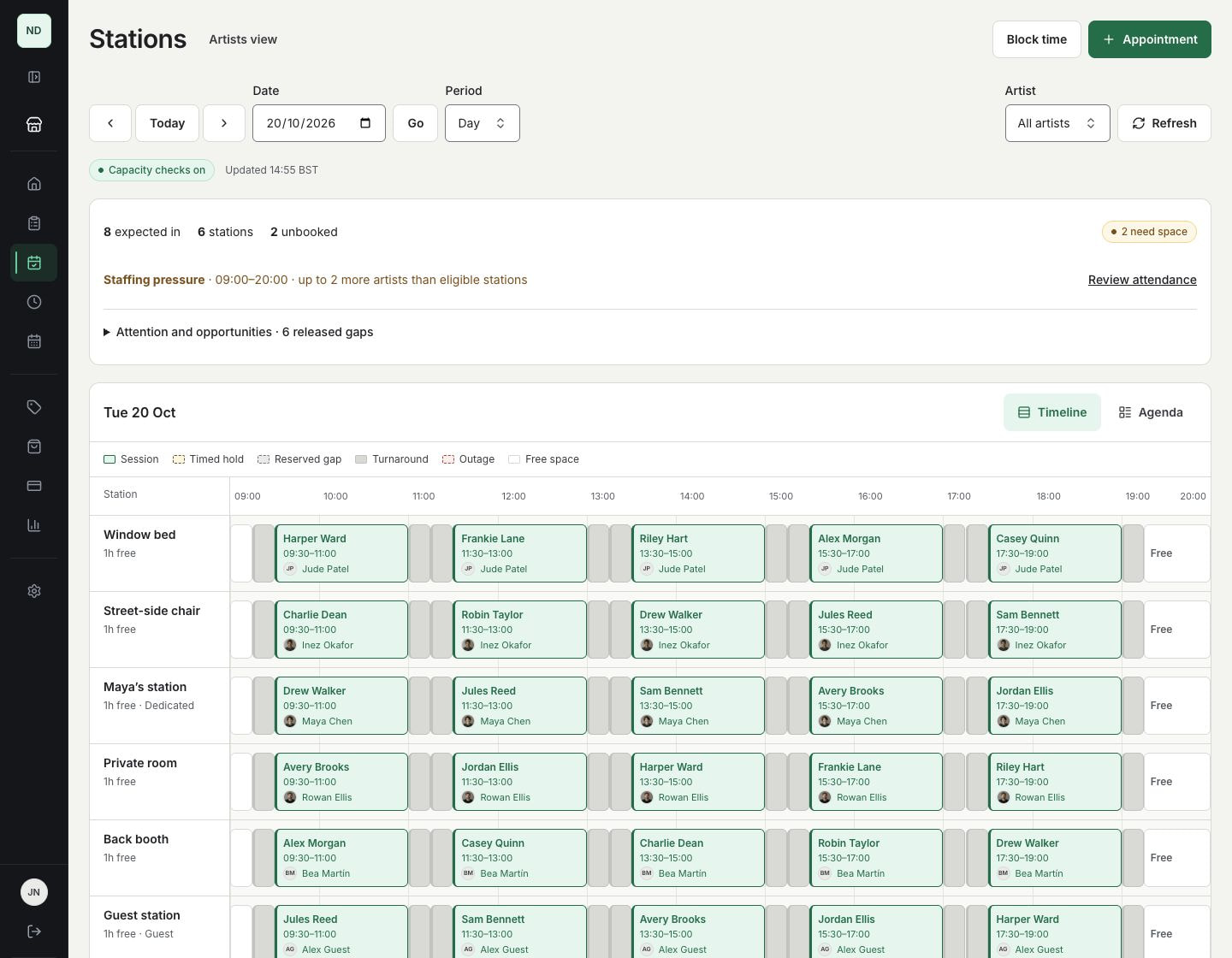
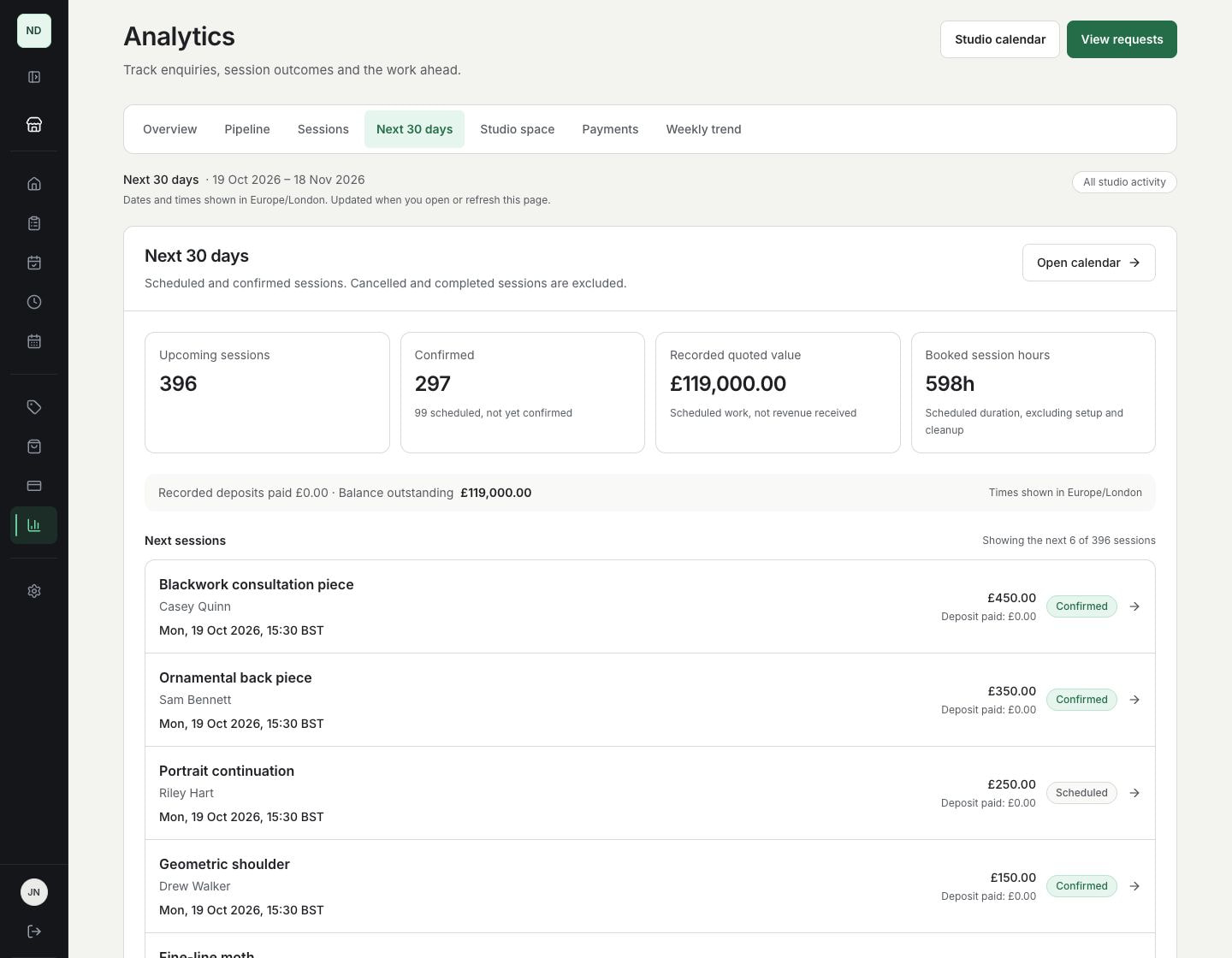
Real InkWell screens from a fictional eight-artist studio with six stations. Protect the space needed today, then review the sessions and quoted work already in the diary.
Thirty sessions. Six stations. One view.
See sessions, time to clean down, holds and reserved gaps on the same timeline. With eight artists due in and six stations, you can see where space is tight before offering another booking.
Understand the work already in the diary
Review scheduled and confirmed sessions, their booked hours and recorded quotes for the next thirty days. Quoted value is shown separately from money received; these demo figures are not customer results.
Give the team a clear next step
Start with the studio morning
See who is expected, who has no appointments, which work needs attention and where cancelled bookings have released usable space. Expected attendance stays separate from check-in.
Digital waivers and staff review
Share your consent document and health questionnaire through a private link. Owners, admins and the assigned artist can review encrypted health answers before the session starts.
Replies and quote history
Read client replies and the saved quote in the same booking workspace. The enquiry owner handles the private conversation; payment controls stay with owners and admins.
See how the studio is doing
Review enquiries, session outcomes, upcoming hours, planned station space and recorded booking payments. Quoted value, money received and bank payouts remain separate. Reporting does not calculate profit.
Understand studio reports →Questions about this workflow
What if an artist calls in sick with appointments booked?
Open the attendance change to see which bookings and reservations need attention. From there, review a change of time or station, or record a cancellation. Existing bookings stay put until you confirm. Sort out the affected work before reducing published attendance.
Can I have more artists than stations?
Yes. Your plan counts active artist profiles; stations are the physical spaces you work in. Choose a plan with room for your active artists, then plan where everyone will work. Check existing bookings and reservations before turning on space checks.
Does a cancellation always free the station?
If the station was reserved only for that appointment, cancelling releases it. If the session sits inside a whole-shift reservation, the shift stays reserved. Release any unused time yourself when you want someone else to use the gap.
Does reception use an artist place?
No. Non-artist receptionists, managers and other staff are included on every paid plan. Each active artist profile uses a place, including owners who tattoo, guests, apprentices and hidden profiles. Your team's usual role permissions still apply.
Is the enquiry owner always the artist doing the tattoo?
No. The enquiry owner handles the next reply and can be assigned separately from the artist who performs the work. Agree the artist and time before booking the session.
Can I archive an artist and keep the history?
Yes. Archive an artist to keep their history and free an artist place. Their profile is hidden and new bookings are closed. You can bring them back when your plan has room, then review their visibility and bookings before opening them again.
Online payments
Request deposits, full payments or remaining balances when online payments are enabled for your studio and your Stripe account is ready. If payment requests are switched off, keep your existing payment arrangements.
Build and preview your page before business verification. When you're ready to go live, save your legal seller details and complete Stripe business verification and any InkWell seller review before publishing.
Read the payment collection guide →
Set up your studio and invite your team
Create your account without a card, get your studio page ready and invite your team. When you're ready to go live, choose a plan for your active artists and complete the subscription and business verification checks.
Set up InkWell yourself. No call required.