Studio operations
Eight artists, six stations: plan your studio day
See who's working, what's booked and where everyone will tattoo. Work through a cancellation and use the checklist to compare software for your studio.
By the InkWell team · Reviewed
You've got eight artists on the roster and six places to tattoo. Before you offer another time, you need to know who's available and where they'll work. Looking at the artist diaries is one part of that picture.
Agree how your team shares the space, then choose a calendar that can keep track of those arrangements. The example below uses a fictional studio and actual InkWell product screens.
Separate people, bookings and space
- Artist availability: when could this artist take an agreed session, after working hours, existing bookings and time off?
- Published attendance: who is expected in the studio, and for which hours?
- Station reservations: which chair, bed or room is protected, for whom and for how long?
A roster is not an attendance plan. Attendance is not a client booking. A free station does not mean the right artist is available to use it.
Work through eight artists and six stations
Northline Tattoo has eight fictional artists and six stations. Maya uses her dedicated station. A guest station needs a dated authorisation. The other stations can be shared by eligible artists.
On the busy day, six artists each have five sessions. Setup and cleanup sit around each booking. On the overstaffed day, eight artists are expected but only six have suitable simultaneous station space. Two artists have no appointments. The owner can review the attendance plan before agreeing more work.
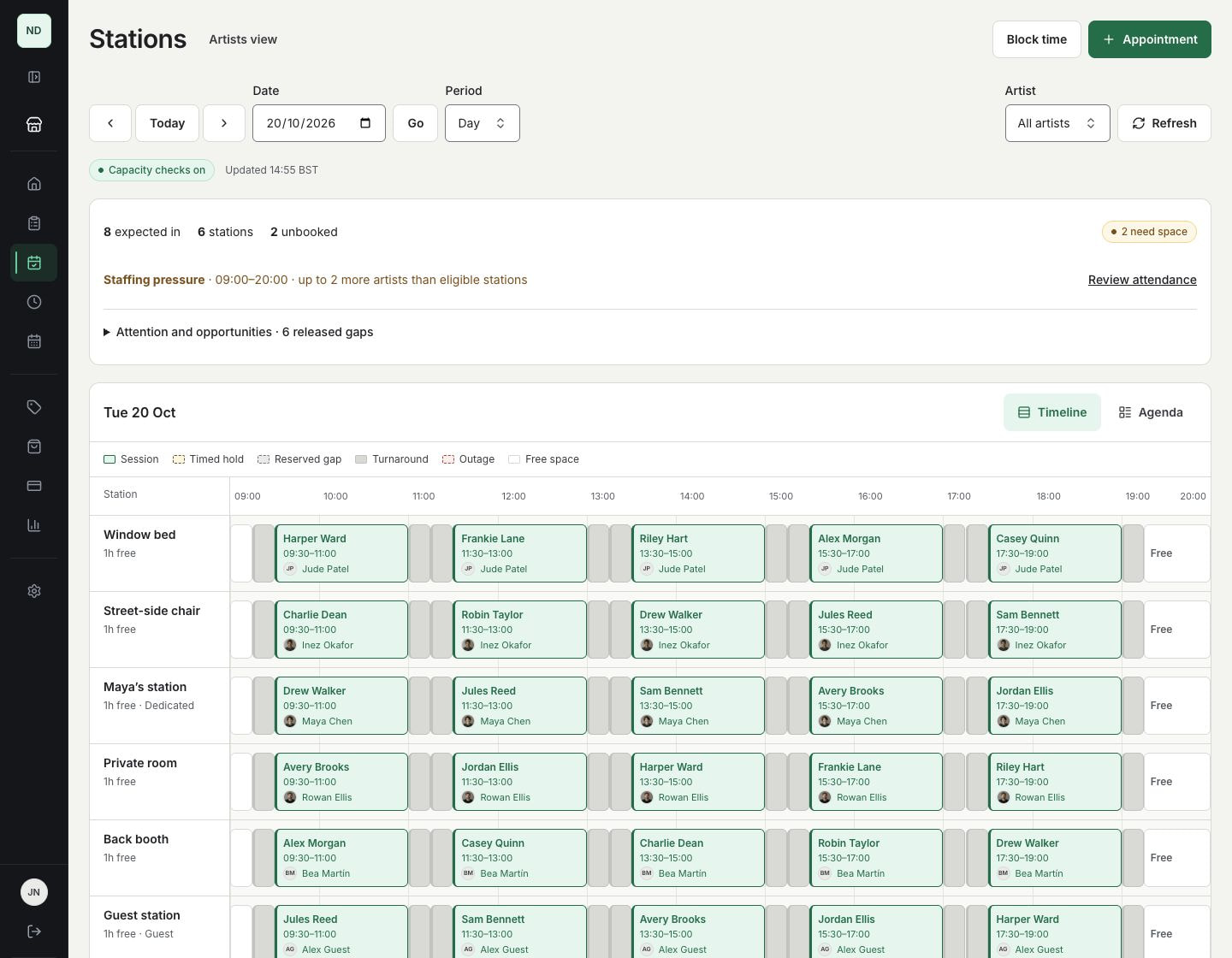
Booking an extra artist into a gap in their own calendar still needs suitable station space for the whole protected interval. Adding more artist profiles does not add more physical places to work.
Decide what a cancellation frees
An artist works 10am to 6pm, with a client from 2pm to 4pm. There are two useful policies:
- Reserve around the appointment. Protect 2pm to 4pm plus setup and cleanup. Another eligible artist can use an unreserved morning interval. Cancelling the independent appointment releases its station claim.
- Reserve the whole shift. Protect 10am to 6pm for that artist, including gaps between clients. Cancelling the 2pm session leaves the parent reservation in place. Deliberately release unused time if the studio wants to share it.
Neither policy is right for every studio. Agree how equipment, privacy, setup and guest arrangements affect sharing. A cancellation should follow the chosen policy rather than quietly changing it.
Start the studio morning
- Check who is expected after holidays and dated changes.
- Review work needing attention, including an outage or missing assignment.
- Look for artists scheduled in without appointments.
- Review staffing pressure against eligible stations, including dedicated and guest rules.
- Check newly released continuous gaps before offering them to a guest or another client.
Use planned-space figures to understand reservations and usable opening hours. They do not measure physical occupancy, artist productivity or attendance at the door.
Test software with your own rules
Use fictional records and ask the provider to demonstrate a busy, quiet and overstaffed day. Keep the same questions for every product:
- Can eight artists share six stations without allowing a seventh simultaneous station booking?
- Can one artist stay restricted to a dedicated station while other stations are shared?
- Does a cancellation release an appointment claim while preserving a whole-shift claim?
- What happens if two people try to take the last suitable station at once?
- Can an outage flag protected work without cancelling clients?
- Can reception operate the calendar while artists see appropriate private views?
- Does the diary remain readable on a phone and with a full week of overlapping bookings?
Resource scheduling is an established category. For example, Fresha describes rooms and equipment resources, and Vagaro describes bookable rooms, chairs and equipment. Check the exact reservation policies and package rather than treating a feature name as proof. These are published descriptions, not independent hands-on tests.
In InkWell: Working solo? Use your artist calendar without setting up stations. Every paid plan includes released space-planning features; the subscription's active artist allowance remains separate from station count. Review existing commitments before enabling station capacity checks.
Explore InkWell studio space · Follow the setup guide · Compare the wider feature checklist
