Studio operations
Book a walk-in or phone client without losing the studio plan
Agreed a tattoo by phone, or got a client at reception? Check the artist's time and station space, book the session and keep the details together.
By the InkWell team · Reviewed
A client phones and you agree a small tattoo for Friday afternoon. Add it straight to the diary while you can see the artist's time. Keep the details there, ready for you or reception to pick up before the appointment.
Work through one phone call
In this fictional example, Casey agrees a floral tattoo with Jude on Friday, 2:30pm to 3pm. Record the client name, session, artist, date and both times. Save a phone number or email if the client provides one; do not invent an address to make a form work.
In InkWell, choose + Appointment, click a free time or drag a range in the calendar. The drawer carries the selected artist and times. An all-artists view asks you to choose the artist. Choose Phone under Booked via, check the availability message, then book.
Check artist time and studio space
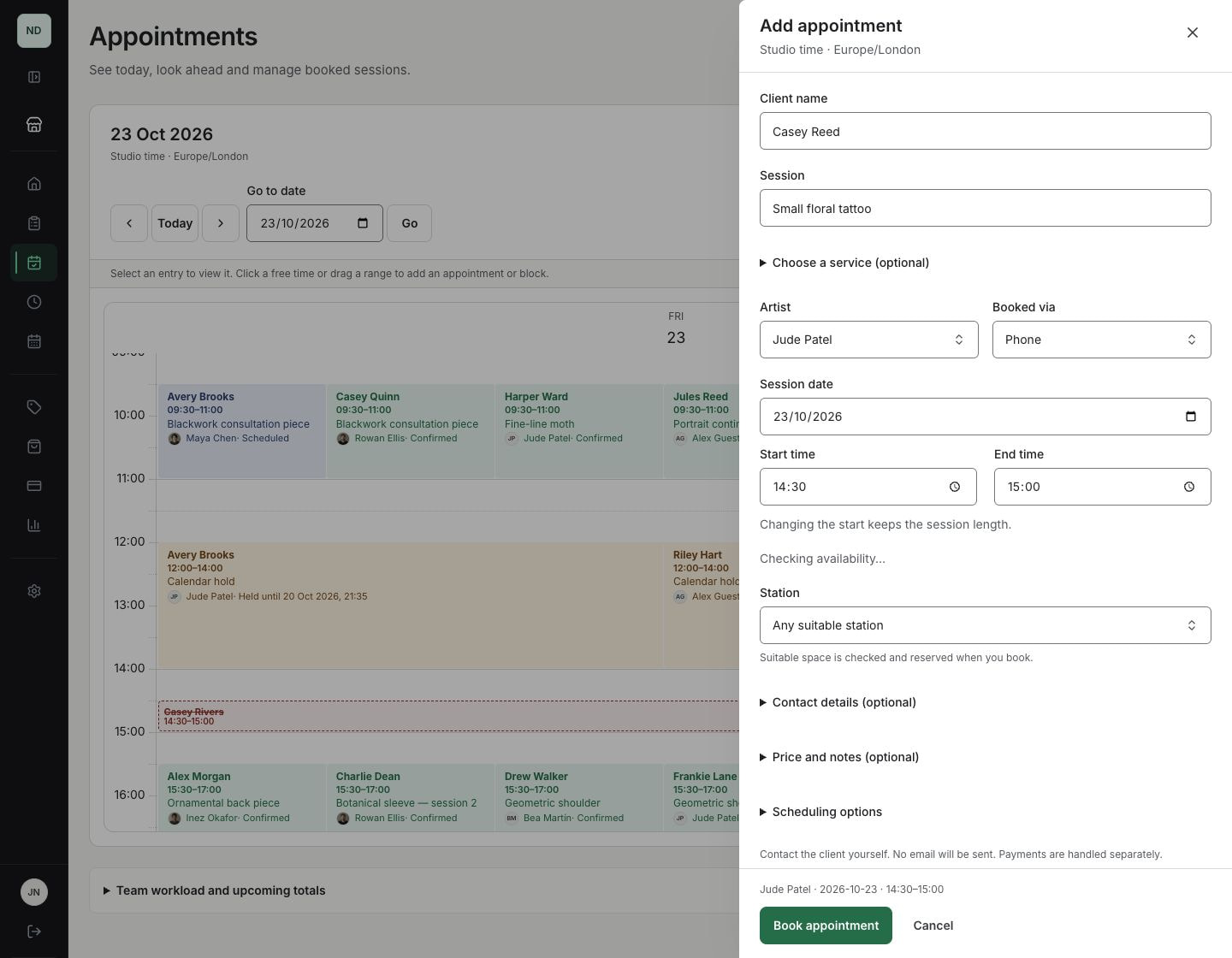
Jude’s calendar may be clear while every suitable chair is reserved. Check the full protected interval, including setup, cleanup and artist buffers. A dedicated station or guest chair has its own eligibility rules. The preview helps you choose; saving checks again in case a teammate booked the gap meanwhile.
Solo artists can use the same booking drawer without setting up stations. For a shared studio, read the eight-artist, six-station example before deciding when a chair belongs to an artist for a whole shift.
Handle a client who is here now
Choose Walk-in and, when appropriate, Start now when I confirm. Choose the session length. The saved start uses the confirmation time, so a conversation at reception does not leave you trying to save a start that is already in the past.
Use Block time for drawing, lunch or administration. A non-client block protects artist time; it is not an appointment, payment or station outage. If it overlaps existing work, review and resolve the listed bookings before saving it.
Keep messages and money clear
Booking time does not mean taking payment. Leave the price blank if it is not agreed; zero and unknown are different. Keep your cash, bank or card-terminal arrangements if you prefer. For online collection, open the saved booking’s Payments section, save the agreed price and deposit, then prepare and preview a deposit, full payment or balance request. Share the private link, or explicitly send a reviewed payment email when available. A booking without email can still use a private payment link. No duplicate enquiry is needed.
Use Message client on the booking for a private conversation the client can read and reply to without an account. Share the saved quote and confirmed payment receipts from Payments → Quotes & receipts. An unpaid, valid payment request can have a reviewed reminder after its first email; the reminder reuses that request and does not create another charge.
Email updates are an explicit choice, initially off for direct bookings. With a usable address, review the recipient before booking and emailing. Without email, tell the client the details yourself. A phone number does not imply SMS. Queued email does not confirm inbox delivery.
Check confirmed receipts and any outside payments before requesting a balance. Payment keeps the appointment’s existing session status. Cancellation and refunds are separate actions. Follow the phone and walk-in payment guide for setup, links, receipts and refunds.
Finish with a reliable record
- Read back the artist, date, start and end.
- Check the saved appointment and station outcome before promising the space.
- Use the booking’s reviewed change and cancellation actions if plans change.
- Keep booking terms, tattoo consent and health review separate from payment.
- For a return visit, use Book again on a standalone booking and review the new draft. Dates, payments, agreement and email permission are not copied.
Follow the step-by-step booking guide, or explore artist calendars and blocked time.
